M6 Mac mini vs. M5 Max and M5 Ultra Mac Studio: U.S. Buying Guide

Apple’s 2026 desktop lineup is now shipping. The official availability announcement sets U.S. starting prices at $899 for the M6 Mac mini, $1,699 for the M5 Pro Mac mini, $2,499 for the M5 Max Mac Studio and $5,499 for the M5 Ultra Mac Studio.
The useful comparison is not “mini or Studio” in isolation. The four tiers cover very different memory ceilings and sustained workloads. Unified memory cannot be upgraded after purchase, and the desktop price excludes a display, keyboard, mouse and external storage. A sensible choice begins with the largest real project a buyer expects to run, not the fastest chip badge available.
Three things to know
- The M6 Mac mini is the practical starting point for general work, development and lighter creative workloads.
- The M5 Pro and M5 Max tiers matter when memory capacity, sustained GPU work or Thunderbolt 5 becomes a daily requirement.
- M5 Ultra and 512GB of unified memory target jobs that cannot fit or finish efficiently on smaller systems; they are not ordinary future-proofing upgrades.
U.S. lineup at a glance
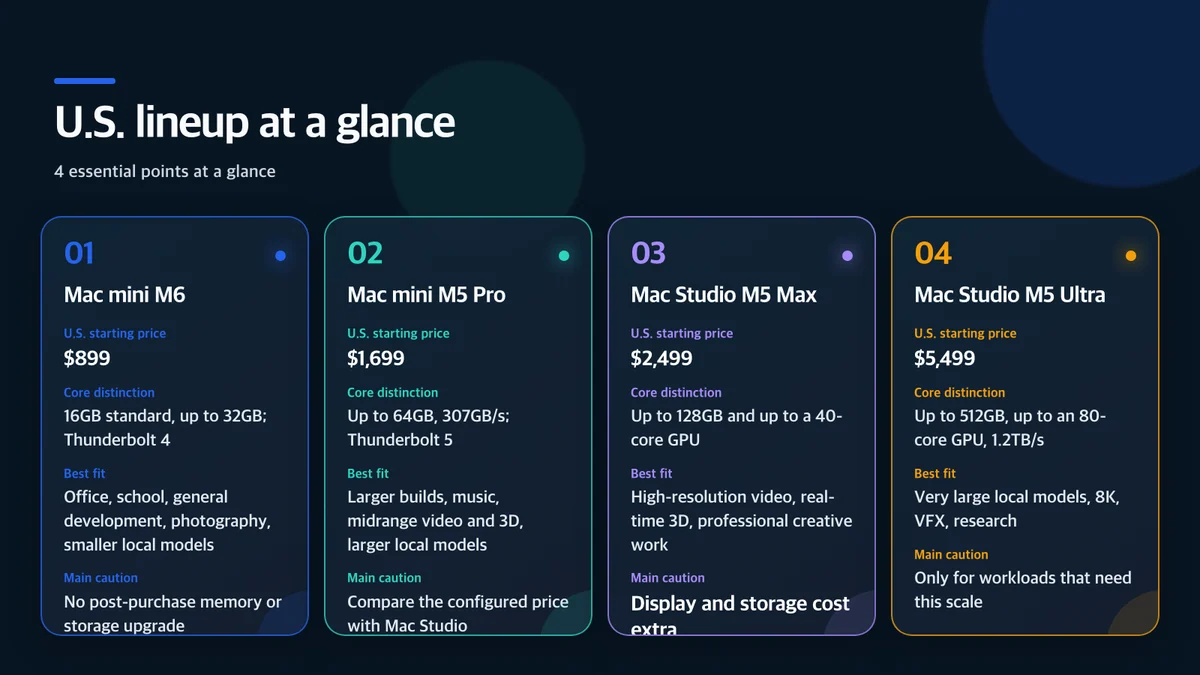
These are base prices before tax and configuration upgrades. Apple lists education prices starting at $799, $1,599, $2,299 and $5,099 respectively. Eligibility and final pricing should be confirmed at checkout.
Who should start with the M6 Mac mini
The M6 Mac mini covers the broadest audience. Apple lists a 12-core CPU, 12-core GPU, dual 16-core Neural Engine and up to 170GB/s of unified-memory bandwidth. The standard configuration includes 16GB of memory, with options up to 32GB.
That is a strong fit for web and office work, school, common Xcode projects, photo work, music production and modest local-AI experiments. Memory deserves more attention than the processor name. macOS, applications, graphics and AI models share the same pool. A buyer who keeps many browser tabs, emulators and development tools open while running a local model should consider 24GB or 32GB.
Apple claims up to 40 percent faster CPU performance, up to twice the graphics and storage performance, and up to four times the AI performance versus specified previous systems. Those figures come from Apple’s own test configurations. Independent tests using the buyer’s applications, long workloads and comparable memory configurations remain more useful than any single maximum.
When the M5 Pro Mac mini earns its price
The M5 Pro configuration reaches an 18-core CPU, 20-core GPU, 64GB of unified memory and 307GB/s of memory bandwidth. It is the compact option for developers and creators whose work no longer fits comfortably within the M6 model’s 32GB ceiling.
The upgrade becomes easier to justify when several of these apply:
- Multiple simulators, virtual machines or containers run together.
- Long 4K timelines or complex music projects are routine.
- More than 32GB of unified memory is necessary.
- Thunderbolt 5 storage or expansion hardware is part of the workflow.
- A local model must run beside demanding professional applications.
Buyers should compare final configured prices. Once memory and storage upgrades push the M5 Pro mini close to an M5 Max Mac Studio, the Studio’s larger memory ceiling, ports and sustained-workload headroom may be the better value.
Mac Studio is a workload decision
The M5 Max Mac Studio offers up to an 18-core CPU, 40-core GPU and 128GB of unified memory. It fits continuous video, 3D, game-development, music and imaging workloads that can keep a GPU and large memory pool busy for hours rather than seconds.
M5 Ultra scales to a 36-core CPU, 80-core GPU, 512GB of unified memory and 1.2TB/s of memory bandwidth. Its defining advantage is not a benchmark trophy. It is the ability to hold unusually large models, visual-effects scenes or scientific datasets in one unified memory pool.
The 512GB configuration is due in late October. Buyers should measure current memory use and verify that their software scales across the Ultra design before paying for it. A large ceiling that an application cannot use is expensive unused capacity.
The local-AI question
More unified memory can load a larger model, but it does not guarantee a better or faster result. Quantization, context length, Metal optimization, batch size and sustained thermals all matter. Someone who primarily uses cloud AI may see little value from 128GB or 512GB of local memory.
An always-on agent also creates operational questions beyond speed:
- Which files, messages and calendars can it access?
- Does it request approval before deletion or external transmission?
- Where are prompts, tool logs and generated files stored?
- Can recurring work continue safely with the display asleep?
- Are retry loops, API use and spending limits bounded?
Those controls may matter more than peak tokens per second for a machine intended to run unattended workflows.
Ports, networks and the real system price
The M6 Mac mini has three rear Thunderbolt 4 ports, while the M5 Pro model moves to three Thunderbolt 5 ports. Both add Wi-Fi 7, Bluetooth 6 and 2.5Gb Ethernet, with 10Gb Ethernet available as an option. Mac Studio uses Thunderbolt 5 for high-speed storage, PCIe expansion chassis and other professional equipment.
None of these desktops includes a display, keyboard or mouse. Video and photo professionals should budget for a color-accurate monitor, fast working storage and a separate backup. A 10Gb Ethernet upgrade is useful only when the switch, cabling and storage server can sustain that speed.
Apple also advertises a U.S. leasing program for eligible buyers. A lease is not ownership, requires approval and may create end-of-term obligations. Compare the total lease cost and return conditions with an outright purchase rather than treating the advertised monthly payment as the product price.
Pre-purchase checklist
- Measure memory pressure and swap during a representative project.
- Identify whether CPU, GPU, memory capacity or storage is the actual bottleneck.
- Compare final prices after the necessary memory and storage options.
- Confirm macOS 27 support for required plug-ins, drivers and professional applications.
- Read independent sustained-performance, noise, power and app-specific tests.
- Add the display, external storage, backup and coverage to the total system cost.
Bottom line
Most buyers should begin with the M6 Mac mini and pay for enough memory. The M5 Pro mini is the next step when 32GB is not enough or Thunderbolt 5 and sustained performance are daily needs. The M5 Max Mac Studio makes sense for professionals who continuously use its GPU and larger memory pool.
M5 Ultra is not simply the “best Mac.” It is a specialized choice for workloads that cannot be completed efficiently within 128GB and lower compute limits. Selecting from measured project requirements is more reliable than buying the highest tier for an undefined future.
Sources and usage notice
- Apple, Mac mini and Mac Studio availability
- Apple, M6 and M5 Pro Mac mini announcement
- Apple, M5 Max and M5 Ultra Mac Studio announcement
This article independently summarizes Apple’s dates, prices and specifications and adds a workload-based buying framework. It does not reproduce Apple photography, renders, logos, interface screens or charts. Performance multipliers are Apple measurements under specified test conditions and may differ from independent results.