Meta One Explained: Plans, AI Limits and What Subscribers Actually Get

Meta has reorganized paid features across Instagram, Facebook, WhatsApp and Meta AI under the Meta One name. It is not one simple plan. The range starts with inexpensive single-app customization, expands into individual bundles with higher AI usage, and reaches business tiers priced for professional teams.
In its official Meta Newsroom announcement, the company says it has launched more than 50 features and recorded 15 million subscriptions and trials. That is a company-reported combined figure, not an independently verified count of paying subscribers.
Meta also warns that plans, benefits, prices and availability may differ by region, app and account. The U.S. prices below are useful for comparing the tiers, but the final checkout screen remains the authority for a particular account.
Three things to know
- Meta One covers three different products: single-app perks, individual AI bundles, and creator-business operations tools.
- Announced U.S. prices range from $2.99 a month for WhatsApp Plus to Max starting at $499 a month.
- Meta says core app experiences and everyday Meta AI use remain free, while paid plans expand specialized features and compute-intensive AI usage.
Four plan groups
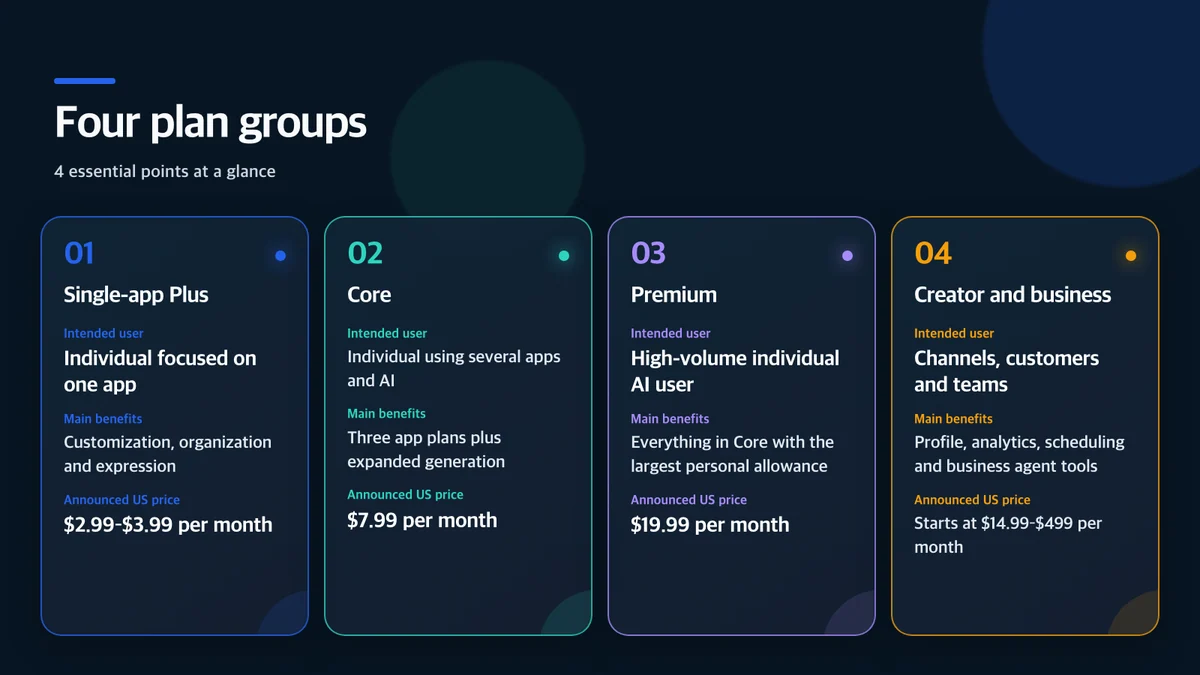
Instagram Plus and Facebook Plus each cost $3.99 per month in the U.S. announcement. WhatsApp Plus costs $2.99. Core combines the three single-product benefits and increases use of image generation, video generation and in-app tools such as Instagram Restyle. Premium includes Core with more room for AI creation.
The professional tiers are Essential, Advanced, Expert and Max. Starting prices are $14.99, $49.99, $149 and $499 per month. “Starting at” matters: the feature set, account type and capacity can change the actual charge.
What single-app Plus plans sell
Instagram Plus adds new typography choices for direct messages and Stories, alerts tied to selected Story viewers, and message previews. Facebook Plus expands Messenger personalization, Reels analytics and reaction options. WhatsApp Plus offers additional themes and icons, effect-based stickers and a higher chat-pinning limit.
These are not primarily ad-removal plans. The announcement emphasizes personalization, organization and extra interaction features. A user should therefore ask whether any feature will be used repeatedly each month. A custom icon or font can be attractive without being valuable enough to justify a recurring charge.
Meta described WhatsApp backup storage and Focus Schedules as forthcoming tests rather than universally available benefits. Announced experiments should not be counted as current features when comparing subscriptions.
Core and Premium mainly expand AI usage

Meta says everyday Meta AI use and the core experiences of its apps will stay free. Core and Premium do not create first access to AI. They offer more use of compute-intensive image and video generation, Instagram Restyle, voice effects and related creative tools.
The announcement does not publish one universal allowance such as a fixed number of images or seconds of video for every account. Phrases such as “more usage” and “the most room” are not enough to calculate value per generation. Before subscribing, check:
- daily or monthly image and video limits shown for the account;
- whether exceeding a limit creates a wait, slower service or another charge;
- exactly which Instagram, Facebook, WhatsApp and Meta AI tools each tier includes;
- whether generated projects remain accessible after cancellation;
- whether the service terms permit the intended commercial use.
The free-service commitment is meaningful, but free and paid allowances can change. A durable production workflow should not depend on an unspecified quota without a backup plan.
Creator and business tiers are a different category

Essential and higher tiers shift the focus from personal customization to account operations. Features include an enhanced profile, a more prominent follow button on Reels, follow invitations for people who engage with content, and additional capacity for Meta Business Agent. Verification, verified-channel access and impersonation protection are included subject to successful verification.
Advanced adds tools such as scheduling Stories up to 30 days ahead, adding links to organic posts and Reels, exporting analytics, deeper audience information, team access without password sharing, more linked devices and additional WhatsApp business broadcast credits. Expert and Max increase feature access and Business Agent capacity for larger teams.
An AI customer-response feature should not be evaluated only by how many messages it can send. A business needs escalation rules for prices, refunds, private information and uncertain answers. It also needs records showing what the agent said and when a person took over.
Six questions before paying
1. Is the feature already available on this account?
Global availability and simultaneous availability to every account are not the same. A staged rollout can produce different menus for two users in the same country.
2. What is the exact AI allowance?
If the app does not show a clear limit, compare the plan after a month of measured use rather than assuming “Premium” means unlimited.
3. Does it overlap with Meta Verified?
Verification, impersonation protection and account-support benefits may overlap with an existing subscription. Check whether plans combine, replace or stack charges.
4. Who can access a team account?
Password-free team access is useful only when roles are narrow and access is removed promptly when a contractor or employee leaves.
5. What happens to stored projects after cancellation?
Future Edits Plus cloud storage and synchronized projects make export and retention rules important. Keep master files in a separate storage system.
6. Can generated material be used commercially?
The subscription price does not eliminate the need to review service terms, trademarks, likenesses, copyright and factual accuracy before publishing an AI-assisted asset.
Who may benefit
A person who uses one Meta app daily and repeatedly values a specific organization or customization feature may find a single-app plan sufficient. Someone who creates a high volume of images or video across several apps should compare the account’s actual Core and Premium limits. A business should treat Essential or Advanced as an operations investment and measure time saved, lead quality and customer-service accuracy.
Occasional users have little reason to rush. Meta says the core experience remains free, so a user can measure where the free service becomes limiting before choosing a paid tier. The company’s 15 million subscription-and-trial figure does not answer whether an individual plan is worth its price.
Bottom line
Meta One is a ladder of subscriptions rather than a single bundle. It places consumer customization, higher AI usage and professional account operations under one label, even though those customers have very different needs.
For a U.S. user, the sensible decision begins with the feature list and allowance displayed at checkout, not the name of the tier. Use the free service long enough to identify a recurring constraint, then buy the smallest plan that removes it. Businesses should add permission, review and data-retention controls before automating customer communication.
Sources and usage notice
This article independently summarizes Meta’s announced features, U.S. prices and company-reported adoption figure, then adds a buyer-focused evaluation. It does not reproduce Meta photographs, video, app screens or logos. Check the account’s current checkout page before purchasing.