OpenAI DevDay 2026 Recap, Part 2—Space, Pages, Plugins and Pro 500
The second half of DevDay 2026 was less about a new model and more about a change in what ChatGPT is supposed to be. OpenAI is expanding it from a single answer box into a shared workspace where people, agents and external apps operate over the same context.
Part 1 covered Dots, GPT-6.1 Sol, Codex and the API announcements. Part 2 follows the execution layer into the developer and workplace ecosystem: open plugin extensions, Space and Pages, recurring team tasks, external sign-in and a new high-usage subscription.
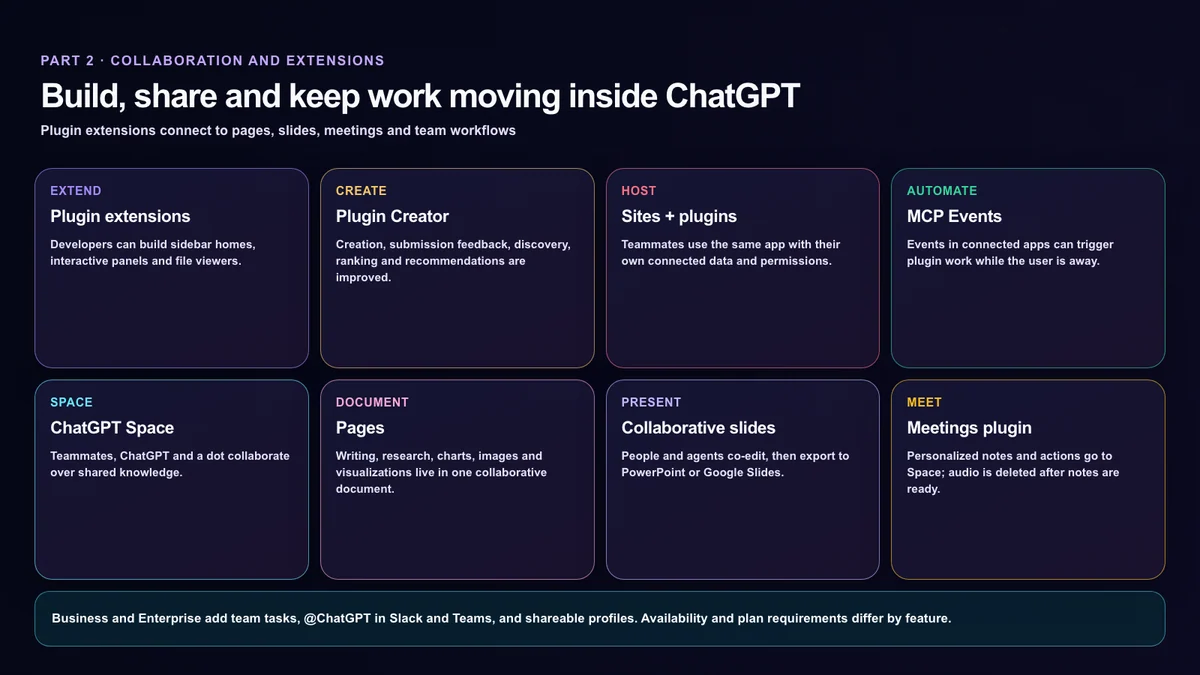
1. Plugin extensions—opening the platform behind ChatGPT features
OpenAI is opening the platform it uses to build ChatGPT features so outside developers can create native experiences. Plugin extensions can add:
- a dedicated home in the ChatGPT sidebar,
- interactive panels that sit alongside a conversation, and
- custom viewers for file formats a product supports.
This is broader than a connector that makes one API call. A plugin can have its own working surface and file experience inside ChatGPT. The official recap lists plugin extensions for all plans.
2. Creation, submission and discovery change with the platform
Plugin Creator helps developers build plugins, while a redesigned submission flow provides clearer feedback. OpenAI also says directory ranking, discovery and in-conversation recommendations are improving.
The critical permission boundary is that the user chooses a plugin and approves the access it receives. A recommendation inside a conversation should not silently connect an app or grant broad access. Developers still need least-privilege scopes, plain-language permission descriptions and a clear policy for data retained after disconnection.
Building and publishing are also separate. The official submission guide describes uploading a ZIP package, resolving automated findings and submitting for review. Once approved, the developer chooses when to publish. Easier creation does not mean immediate public distribution. Metadata, skills and packaged server-configuration changes still require a new package submission.
3. Sites can host plugins for a workspace
Supported ChatGPT plugins can now be added to Sites. Colleagues in a workspace can use the same app while relying on their own connected data and permissions. OpenAI also says automations will be easier to add and manage.
Availability is limited to Business, Enterprise, Healthcare and Edu. This is not a general-purpose instruction to install arbitrary plugins on any public website; it is a capability for supported plugins within organizational Sites.
4. MCP Events—connected-app events can start work
OpenAI is adding support for the proposed MCP Events specification. A new item on a project board could trigger a plugin to read linked documents and draft a plan while the user is away.
Event-driven work creates operational questions alongside convenience. A production automation needs idempotency when the same event arrives twice, clear retry behavior, visible failure state and human approval before external messages or irreversible edits. The recap lists MCP Events for all plans, while the actual events available will depend on each connected app.
5. ChatGPT Space—a shared home for teams and AI
ChatGPT Space brings teammates, ChatGPT, Codex and a dot into a shared context. A Space can hold files, pages, slides and spreadsheets, and users can instruct ChatGPT or a dot to organize and update the work.
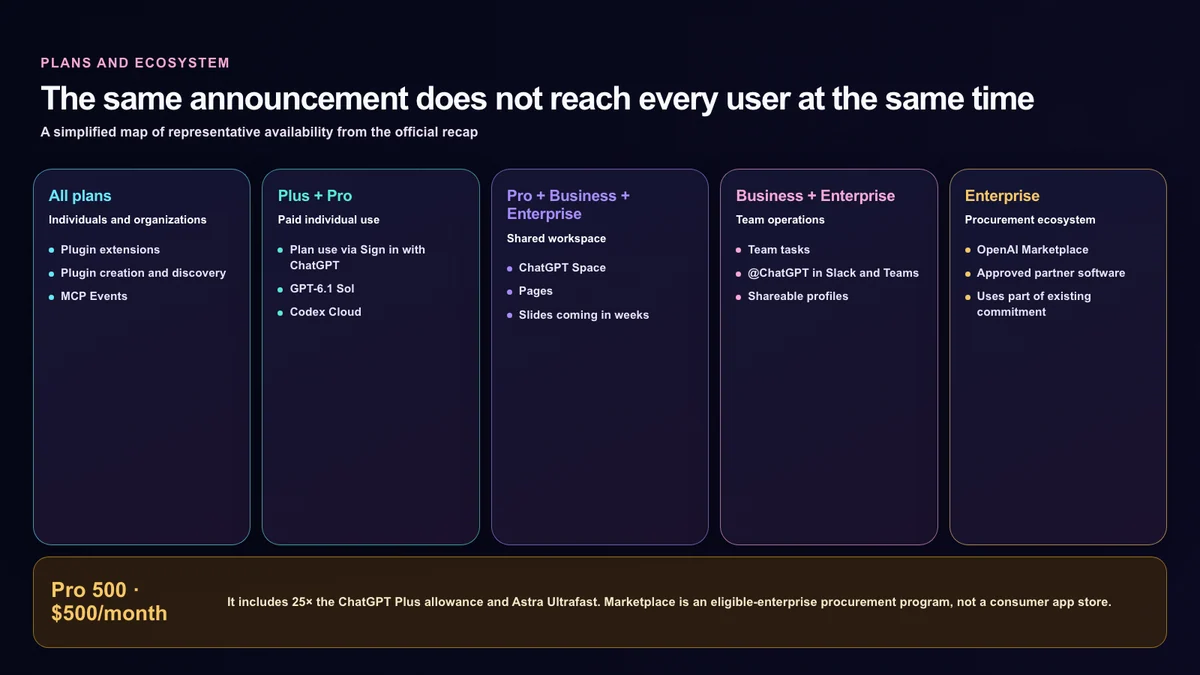
Space is available on Pro, Business and Enterprise in the desktop app and on the web. Mobile can find, read and share pages at launch; mobile creation, editing and collaboration are coming later. OpenAI’s FAQ says Library becomes Space for these plans.
6. Pages—people and agents co-edit one document
Pages are collaborative documents created from a ChatGPT conversation. They support writing and research as well as charts, images, visualizations and code. Connected tools can help keep a page current rather than leaving it as a static export.
Teammates can edit in real time, leave comments and tag ChatGPT or a dot for revisions or next steps. Pages are available on Pro, Business and Enterprise.
How to begin with Space and Pages
The Space quickstart begins with a new page or an existing conversation saved as a page. Add the notes, files and links the work should use, then ask ChatGPT for a specific result. Material from Google Drive requires the app connection and identification of accessible files; creating a shared Space does not automatically connect every outside source.
The Pages guide describes editable blocks and a / insert menu for tables, images, files and subpages, as well as references, reusable prompts, tasks and Agent Instructions. That makes a page useful for keeping working standards alongside an artifact. Written instructions and an actually saved recurring task remain different things.
The sharing guide distinguishes view, comment and edit permissions, with actual choices varying by account, workspace and recipient type. Check private-source content before sharing, then confirm that a colleague can open the work with the intended permission. Mentioning an agent in a comment does not grant access beyond the page or connected app’s existing controls.
The Space agent guide explicitly says Keep Updated is unavailable at launch. Request recurring work in chat, then verify the saved task’s timing, enabled state and actual run. Collaborative Pages and universal automatic document updates are not the same launch capability.
7. Collaborative slides are still “coming in the weeks ahead”
OpenAI previewed interactive slides created from a conversation or an existing template. Multiple people and agents can edit simultaneously, leave comments, present in ChatGPT and export to PowerPoint or Google Slides while preserving formatting.
At announcement time, however, collaborative slides were coming in the weeks ahead. The eligible plans are Pro, Business and Enterprise, but eligibility does not mean the feature was already present on every account.
8. Teams and recurring shared tasks
Business and Enterprise can organize colleagues as a team and share pages, slides, plugins and spreadsheets. Recurring work such as a weekly project update can become a team task triggered by a schedule or an event like a new email or Slack message.
Because teammates can refine the instructions together, the automation can survive changes in ownership. That also creates a governance need: organizations should record who changed the instructions, who approved external actions and what happened during each run.
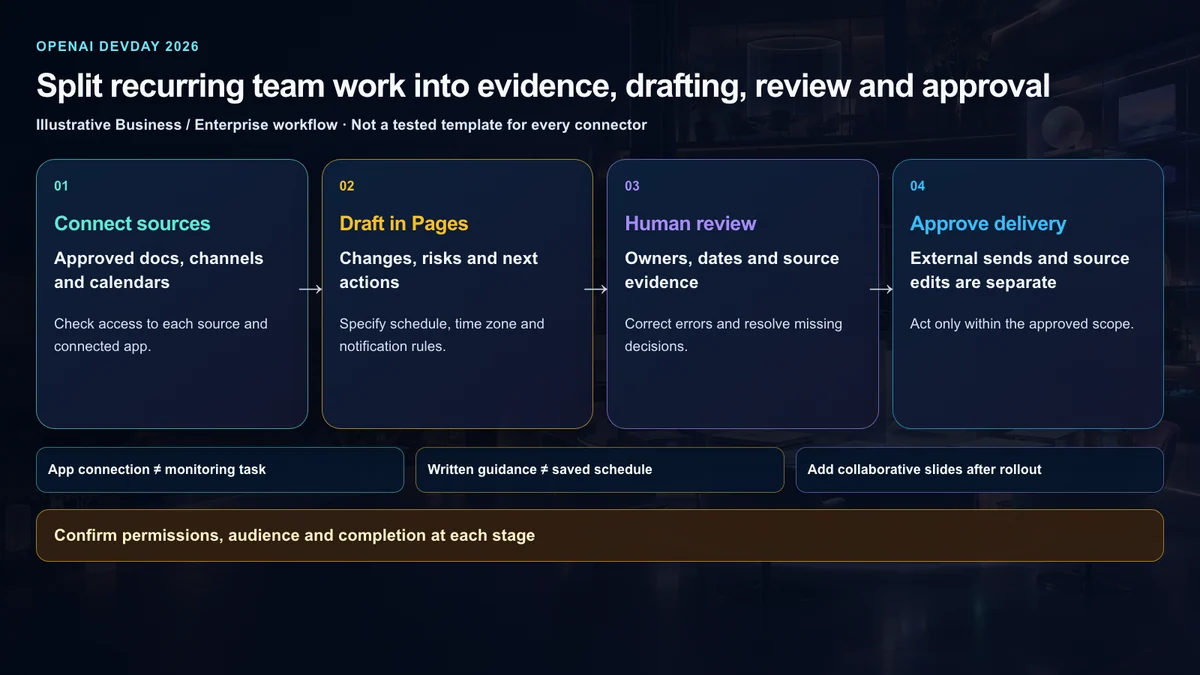
An example weekly project-report workflow
This is an illustrative adoption pattern, not a tested template guaranteed across every connector. A Business or Enterprise team could first collect a project brief and decision log in Pages, then connect the relevant documents and channel under the available permissions. A team task could draft changes, deadline risks and next actions every Friday at 4 p.m. America/New_York time using only approved sources.
People would check owners, dates and source evidence before approving distribution. Customer emails and edits to original records would remain separately approved actions. A team using Meetings could add consented meeting notes as supporting material. Collaborative slide generation belongs in a later step only after that feature reaches the account; a promised feature should not become a dependency in today’s workflow.
The important sequence is collect evidence, draft, review, approve delivery. Choose whether the job needs a schedule or a supported app event, and make the notification policy explicit so unchanged state does not produce daily noise.
9. @ChatGPT in Slack and Microsoft Teams
Business and Enterprise users can mention @ChatGPT in a channel, thread or direct message. It can use admin-connected tools or a user’s own tools under that user’s permissions.
Teammates can add context and refine the result in the same conversation without each person needing an individual ChatGPT license, according to OpenAI. Tool execution still needs to remain within the caller’s and workspace’s permission boundaries.
10. Meetings—consent matters before transcription
The Meetings plugin takes notes for online calls or in-person conversations and saves personalized summaries and action items to ChatGPT Space. It runs through the ChatGPT macOS app rather than adding a bot participant to the call.
Meetings is in beta for all Pro and Business plans on macOS. Enterprise is limited to an alpha group, and Windows, iOS and Android support is coming later. OpenAI says audio is deleted once notes are ready and cannot be accessed or replayed.
The user must tell everyone that notes are being taken and obtain consent before starting. The in-app reminder is visible to the user; it does not notify other participants or obtain consent on the user’s behalf. Organizations should apply their own legal and workplace-consent policy when participants join from different jurisdictions.
11. Shareable profiles
Business and Enterprise users can collect public or reusable Sites and plugins in a profile that others can discover. Teammates can also find shared skills, with skill sharing limited to the workspace.
That creates a distribution channel for internal builders, but public profiles and private workspace artifacts need separate publishing controls so confidential tools do not leak through descriptions or examples.
12. Sign in with ChatGPT—plan usage without handing over an API key
Sign in with ChatGPT lets users authenticate to participating apps and sites with a ChatGPT account. Identity sign-in is available globally. Plus and Pro users can also choose to let eligible AI requests in participating tools count against the ChatGPT Work and Codex usage included in their plan.
Launch examples include OpenCode, OpenClaw, T3, Dactyl, Warp, Cognition’s Devin, Notion and Vercel. Not every sign-in-compatible app supports plan usage. Airtable, Canva, GitLab, HubSpot and Supabase are listed as compatible with sign-in but not currently available for token sharing.
Users can set a weekly limit for each app and review usage in ChatGPT Settings. The app limit is a cap within the overall plan allowance, not a separate pool. An API key is not shared, but the app still receives basic account information and any separately approved permissions.
Sign-in and spending permission are separate choices
The current usage help article says users can sign in without enabling plan usage. Enabling plan usage alone does not share ChatGPT conversations or memories. The outside app can still charge for its subscription, infrastructure or premium features.
App credit use after plan exhaustion is a separate, default-off choice. Where available, it requires explicit permission and an app cap of 100%; setting that cap alone does not enable credits. Review automatic credit purchases separately because continued use can cause additional charges when those purchases are enabled. Signing out of the outside app is also not the same as disconnecting its ChatGPT login connection.
13. Pro 500—$500 per month and Astra Ultrafast
OpenAI’s official Pro-tier help article confirms that Pro 500 costs $500 per month. The DevDay recap describes it as offering 25 times the ChatGPT Plus allowance and includes Astra Ultrafast.
Among the personal Pro tiers, Ultrafast is included only with Pro 500. Included usage is consumed first, with an eligible credit balance used afterward if the user allows it. “25 times Plus” is not the same as unlimited use; model-specific allowances and reset periods can still apply.
What changes for Pro 100 and Pro 200 subscribers
The official monthly prices are $100 for Pro 100, $200 for Pro 200 and $500 for Pro 500. Buying credits on Pro 100 or Pro 200 does not unlock Ultrafast. Check checkout for the actual charge rather than assuming the published subscription price settles every billing detail.
New Pro 200 subscriptions are available again but carry a lower included allowance. Eligible existing subscribers keep their previous allowance through October 29, 2026, then move to the lower allowance without a change to the $200 monthly price. That temporary protection does not add Pro 500 features or Ultrafast. Affected users should check their account email and the Pro-tier help article.
For an individual, Pro 500 is a capacity-and-latency choice. For a team, organizational data controls and shared operations are a different requirement. A larger personal allowance is not a substitute for Business or Enterprise administration; compare the work, collaborators and real weekly usage before treating the highest-priced personal tier as the default.
14. OpenAI Marketplace is not a consumer app store
OpenAI Marketplace allows eligible enterprise customers to apply part of their existing OpenAI commitment toward approved partner software. The first 32 partners include Adobe, Figma, Sierra, Decagon, HubSpot, Salesforce, ServiceNow, Harvey, Legora, Palo Alto Networks, CrowdStrike and Baseten.
This is not a storefront where individual users download ChatGPT apps. It is an enterprise procurement program that gives customers more options for allocating already committed spending.
What U.S. teams should evaluate before adopting the stack
The strategic shift is larger than the number of new menu items. OpenAI wants ChatGPT to become a control plane for documents, meetings, Slack or Teams, plugins and scheduled work.
Before adoption, teams should separate six questions:
- Is the data governed by an individual Pro account or an organizational Business or Enterprise workspace?
- Which read, write and send permissions does each plugin request?
- How are duplicate events, failed automation runs and retries recorded?
- Can the organization verify participant consent and audio deletion for meetings?
- How are shared Space artifacts separated from personal pages in search and memory?
- What app-specific usage caps and post-allowance credit settings are enabled?
Bottom line—ChatGPT is moving from conversation to workspace
The second half of DevDay converges on a clear design. Plugins bring outside capabilities into ChatGPT. Space and Pages create shared context. Team tasks and MCP Events keep recurring work moving. Sign in with ChatGPT connects identity and plan usage to outside tools, while Marketplace adds an enterprise buying channel.
The rollout is also fragmented: all-plan features, Pro-only access, Business and Enterprise controls, a macOS beta, limited alpha programs and “coming in weeks” previews sit next to each other. A visible menu item is not the same thing as a production-ready organizational deployment.
Read together with Part 1’s Dots, GPT-6.1 Sol, Codex and API announcements, the strategy is clear. OpenAI is not stopping at larger models; it is building the workspace, permissions, connections, subscriptions and procurement layer around agents.
Primary sources
- OpenAI DevDay 2026 official recap
- ChatGPT Space official page
- OpenAI Help: The Meetings plugin in ChatGPT
- OpenAI Help: Using your ChatGPT plan in other apps and sites
- OpenAI Help: About ChatGPT Pro tiers
- OpenAI Plugins
OpenAI, ChatGPT, Codex, Dots, Slack, Microsoft Teams and related names and marks belong to their respective owners. Zoogom.com is an independent editorial site and is not sponsored, endorsed or operated by OpenAI or the companies mentioned. This article paraphrases official materials and does not reproduce press photography, product screens, event footage, corporate logos or social-media screenshots.