OpenAI DevDay 2026 Recap, Part 1—Dots, GPT-6.1 Sol, Codex and the API
OpenAI’s September 29 event in San Francisco was, in the company’s words, its biggest DevDay yet. The official recap lists more than 20 major announcements across ChatGPT, Codex, models, plugins, collaborative workspaces and subscriptions.
That number needs a careful reading. OpenAI did not announce 20 new models or 20 fully independent apps. It counted a mix of models, speed tiers, cloud features, limited previews, plugin capabilities, collaboration products and a new subscription tier.
This recap is split into two articles so the release conditions do not disappear inside a single long list. Part 1 covers Dots, GPT-6.1 Sol, Codex and the APIs. Part 2 covers ChatGPT Space, Pages, Plugins, Pro 500 and OpenAI Marketplace.
What changed from the pre-DevDay rumors
Before the keynote, reports and interface traces pointed to an always-on agent called o, Managed Agents, and a possible standalone GPT-6 Cyber announcement. The final slate landed near some of those themes but with different product names and packaging.
- The official always-on agent is called Dots.
- Managed-agent speculation materialized as Bedrock Managed Agents powered by OpenAI, built with Amazon.
- The security centerpiece was Codex Security Cloud, including access to Daybreak Blue models, rather than a broad standalone GPT-6 Cyber release.
- The “20+” referred to more than 20 major announcements, mixing products, features, plans and ecosystem programs.
OpenAI has not said that the rumored internal o label and Dots were the same development project. Our pre-event analysis of the “20+ launches” teaser remains a record of what was verifiable before the keynote; this follow-up uses the official launch materials.
1. Dots—an agent that keeps working after the conversation ends
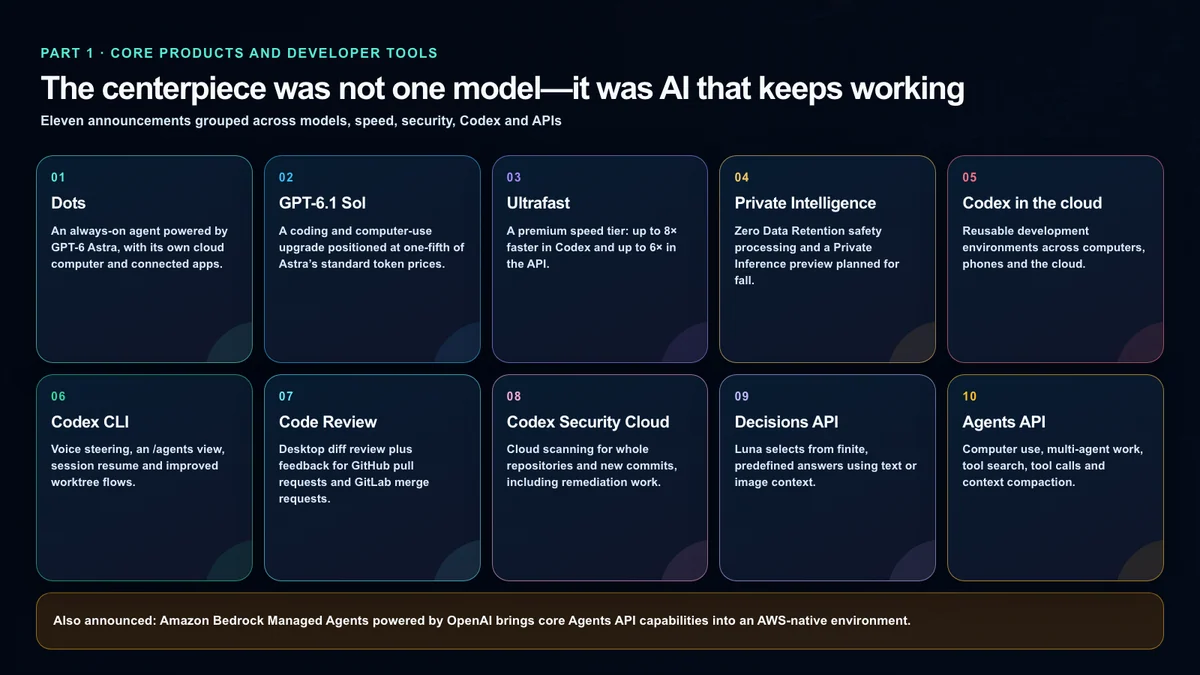
According to OpenAI’s official Dots announcement, Dots are always-on agents powered by GPT-6 Astra. Instead of ending with a single answer, a dot is meant to learn a user’s goals and standards, progress multiple projects at once and continue working while the user is away.
Each dot has its own cloud computer and browser. OpenAI says the plugin ecosystem can connect it to more than 4,000 apps, and users can reach it through ChatGPT, Slack and Microsoft Teams. Its cloud computer is separate from the user’s machine by default; local-computer or Codex-cloud access requires permission.
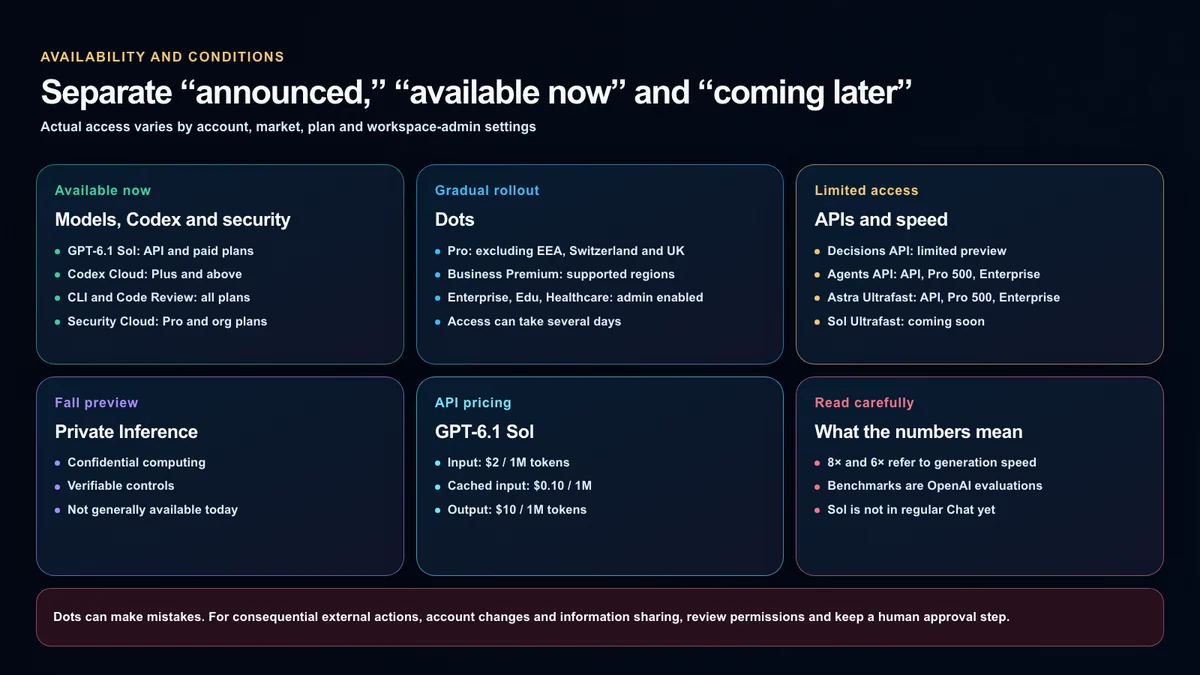
The initial Pro rollout notice excluded the European Economic Area, Switzerland and the United Kingdom; the United States, Korea and Japan were outside those exclusions. The help article rechecked September 30 now says “eligible markets” without restating that list. Region eligibility is not immediate account access: rollout timing and workspace controls still apply, so the account’s availability notice is the final check.
The first dot is included with Pro or Business Premium at no extra cost. The launch post separates dot conversations, which do not count against ChatGPT limits, from Codex and ChatGPT Work tasks, which do. The help article checked September 30 describes an allowance for deeper work with expanded limits during the first month. That is not a blanket promise of unlimited free work. Check the account’s Usage screen for the allowance that actually applies.
Setting up a dot and giving it a useful responsibility
The official setup guide starts in the desktop app or a desktop browser. Connect only the email, calendar or file apps the job needs; connecting your own computer is optional. Mobile web is not supported, and mobile-app access depends on the supporting update and account availability.
A useful first instruction names the result, sources, approval boundary and notification policy. This is an illustrative instruction, not a report of a tested deployment:
Each weekday at 9 a.m. America/Los_Angeles time, check the connected project channel and calendar for changes to this week’s deadlines. Summarize changes with source links. Notify me only if a deadline is at risk or a decision needs me. Ask before sending messages or editing source material.
Connecting an app does not itself create a monitoring task. The tasks and memory guide explains how to specify a time zone, end date, destination and notification conditions, then confirm the saved schedule. A cloud coding task can run with your computer offline in a Codex environment you prepared first. A task on your connected local computer needs that computer online with ChatGPT open.
Texting is a limited beta for some U.S. Pro users, not a feature every U.S. account receives. It is unavailable in Business and Enterprise workspaces and does not extend to Korea or Japan. At launch, dots also cannot initiate calls or receive their own standalone email addresses.
Primary dots and enterprise specialist dots are different
OpenAI also previewed specialist dots with their own organizational identities, credentials and system access. These are focused enterprise pilots with responsibilities, tools and approvals defined alongside customers—not automatic company-wide authority for a personal dot. The official announcement separates these pilots from the primary-dot rollout.
Dots’ safeguards—and the risk that remains
An always-on agent is primarily a permissions product. OpenAI describes several boundaries:
- Proactive research uses read-only connected tools when the user is not actively directing the dot.
- That mode cannot send messages, alter app content or control a browser or computer.
- Custom Rules can allow, require approval for or block specific actions.
- Some sensitive actions, such as changing a password, always stay with the user.
- Activity View lets the user inspect, redirect or stop background work.
Those controls reduce risk, but they do not make autonomy error-free. OpenAI explicitly says Dots can make mistakes and consequential work should be reviewed. Payments, public messages, account permissions and customer-data changes should retain a human approval gate and a visible audit trail.
Pause, disconnect and Reset are separate controls. Pause stops the dot until resumed. Disconnecting an app does not erase information already obtained. Reset deletes the dot, its conversations, saved memories and scheduled tasks. A temporary break should not be confused with deleting the agent’s accumulated work.
2. GPT-6.1 Sol—near-Astra positioning at a lower price
GPT-6.1 Sol is an upgrade to GPT-6 Sol. OpenAI positions it as approaching Astra on agentic coding, computer use and professional work at one-fifth of Astra’s standard input and output token prices.
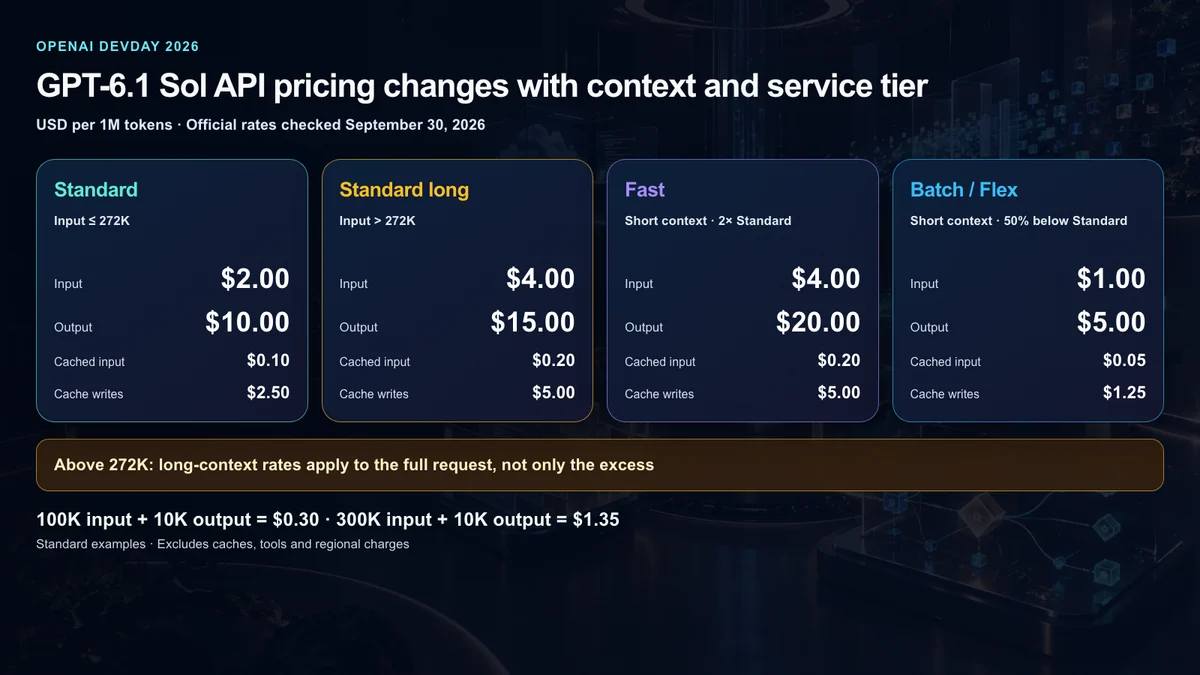
The API model ID is gpt-6.1-sol, with standard prices of:
- $2 per million input tokens
- $0.10 per million cached input tokens
- $10 per million output tokens
It is available to Plus, Pro, Business, Enterprise and Edu users in ChatGPT Work and Codex, and it is available through the API. One important limitation: GPT-6.1 Sol is not yet available in regular Chat. A missing model in the normal Chat picker is therefore not evidence of a failed rollout.
API specifications and the long-context price boundary
The model documentation specifies a 1,050,000-token context window, up to 128,000 output tokens, text input/output and image input. Reasoning levels are low, medium by default, high, xhigh and max; none and minimal are unsupported. Tool calling requires the Responses API. Chat Completions works without tool calling.
An input above 272,000 tokens changes pricing for the entire request, not just the excess. Long-context rates per million tokens are $4 input, $0.20 cached input, $5 cache writes and $15 output. A standard short-context cache write costs $2.50; it is not the same charge as the $0.10 cached-input read.
Here are our own calculations, excluding caches, tools and regional charges. At standard short-context rates, 100,000 input tokens plus 10,000 output tokens cost 0.1 × $2 + 0.01 × $10 = $0.30. With 300,000 input tokens, the same output costs 0.3 × $4 + 0.01 × $15 = $1.35. Loading an entire repository or a long PDF can therefore change both sides of the bill.
Fast costs twice Standard; Batch and Flex cost 50% less. Sol supports U.S. and EU data residency, but Fast is unavailable with EU residency. Supported regional processing carries a 10% premium. Account location and processing region are different choices. Check the official pricing table for both model and service tier.
The benchmarks are notable, but they are company evaluations
OpenAI says GPT-6.1 Sol matches Astra on DeepSWE v1.1 at roughly one-fifth of the cost. On GDP.pdf, it reports a higher score than Opus 5.5 with fallbacks at less than half the cost per task. On AutomationBench, it reports a 2.2 percentage-point lead over Opus 5.5 at medium reasoning effort.
It also reports a seven-point improvement over the previous Sol on the OSWorld 2.0 offline set and more than double the previous Sol score on Terminal-Bench Science. At low reasoning effort, the share of answers containing a factual error reportedly fell from 11.4% to 7.7%.
Three caveats matter:
- The comparison charts and cost calculations are OpenAI evaluations.
- Research or API environments may differ from production products in system prompts, tools and reasoning settings.
- OpenAI still reports Astra as the highest-scoring model on its hardest science evaluation.
The responsible conclusion is not that Sol beats every frontier model everywhere. It is that OpenAI has materially improved the Sol line’s price-performance for coding, professional documents and computer use.
3. Ultrafast—buying generation speed, not more intelligence
Ultrafast is a premium speed tier for latency-sensitive workloads. OpenAI advertises up to 8× faster token generation in Codex, reaching 300 tokens per second, and up to 6× in the API.
Those figures refer to output speed, not a smarter model. GPT-6 Astra Ultrafast is available in the API and in ChatGPT Work and Codex on Pro 500 and Enterprise. GPT-6.1 Sol Ultrafast was coming soon at announcement time.
API requests select gpt-6-astra with service_tier: "ultrafast". The launch recap quotes up to 6× API speed, while the current developer guide describes up to 8× versus Standard. Neither guarantees equivalent improvement in total task time: tool and network waits remain. The guide recommends persistent WebSockets for frequent tool calls. Short-context Astra Ultrafast costs $60 input and $300 output per million tokens; it is not Sol’s low-cost service tier.
4. Private Intelligence—separate today’s feature from the fall preview
Private Intelligence groups enterprise data-protection work. Zero Data Retention with Private Safety Processing enables automated safety review without giving OpenAI personnel access to the underlying content.
Private Inference is different. It combines confidential computing with strict, verifiable controls, but OpenAI describes it as a preview coming in fall 2026. It should not be reported as a generally available production feature today.
5–8. Codex becomes a cloud development operations layer
The Codex announcements form four connected pieces.
Codex in the cloud
Codex can run on a computer, remotely from a phone or in the cloud from any device. Reusable development environments reduce setup time and let teams share approved settings and permissions. It is available on Plus, Pro, Business, Healthcare, Education and Enterprise.
The Cloud quickstart starts with Work in > Cloud: select or create an environment, connect GitHub repositories and review the prepared dependencies, tools and test results. Publish the environment, wait for its published status, then start a task. Each task has its own workspace while reusing the environment’s project setup. Review the result and request follow-up changes before committing or opening a PR. A completed cloud run is not the same as a production deployment.
Refreshed Codex CLI
The CLI adds voice-based task starting and steering. A new /agents view helps delegate and track multiple tasks, while prompt editing, session resume, worktrees and terminal readability are improved. OpenAI lists it for all plans.
Code Review
The ChatGPT desktop app can show change summaries and diffs, answer questions about potential issues, and support feedback on GitHub pull requests and GitLab merge requests. Automatic reviews can run a first pass in the cloud while the user is away. It is available on all plans.
Codex Security Cloud
Security Cloud scans full GitHub repositories on demand or on a schedule and continuously checks new commits. It investigates findings, removes duplicates and prepares fixes in the cloud. Access to models offered through Daybreak Blue is included without a separate Daybreak application. It is available on desktop and web for Pro, Business, Enterprise and Edu.
9. Decisions API—constraining intelligence to a finite choice
Decisions API focuses Luna’s intelligence on user-defined questions with finite, predefined answers. Developers provide text or image context and receive a result that can classify content, route a request or choose an agent’s next action.
This is different from asking a model for unrestricted prose. A bounded answer space can be easier to validate and integrate, but a poorly designed set of choices can narrow the entire decision. The API launched in limited preview, with broad release planned in the coming days.
10. Agents API with Computer use
Agents API now supports computer use, enabling agents to interact with software. It also brings Codex capabilities such as multi-agent execution, tool search, tool calling and context compaction into applications, with OpenAI operating the underlying infrastructure.
It is available through the API and in Codex and ChatGPT Work on Pro 500 and Enterprise. Computer-use agents face prompt injection, wrong-click and permission risks, so high-impact actions still require isolation, least privilege and human approval.
11. Bedrock Managed Agents powered by OpenAI
OpenAI and Amazon worked together on Bedrock Managed Agents, which takes core Agents API capabilities and integrates them with AWS resources so agents can run entirely in AWS.
This is not another consumer ChatGPT mode. It is an AWS-native enterprise path for organizations that want OpenAI-based agents inside their existing cloud control plane. Identity and access management, network boundaries, data handling and audit policy still depend on the customer’s AWS configuration.
What U.S. users should check first
Eligible U.S. Pro accounts are inside the initial Dots region, although the gradual rollout may delay the menu. GPT-6.1 Sol should be checked in Codex or ChatGPT Work rather than regular Chat. Codex Cloud, the refreshed CLI and Code Review have broader availability.
For organizational deployment, the practical checklist is more important than the product names:
- Which plan and workspace surface actually exposes the feature?
- Is it enabled by default or controlled by a workspace admin?
- Does a connected tool read data only, or can it edit and send?
- Are consequential actions forced through human approval?
- Does usage count as a dot conversation, Codex task or ChatGPT Work task?
- Where can a long-running task be stopped, recovered and audited?
Bottom line—the centerpiece was not one bigger model
The first half of DevDay points in one direction: OpenAI is turning models from answer engines into an execution layer that can hold responsibility and keep working. Dots is the persistent front door, Codex Cloud and Security Cloud are development operations layers, and Decisions API and Agents API let developers embed the pattern elsewhere.
GPT-6.1 Sol is the lower-cost model intended to make more of those workflows practical. Ultrafast addresses latency, while Private Intelligence addresses enterprise data boundaries. But “limited preview,” “coming soon,” gradual rollout and general availability are not interchangeable.
Part 2 examines Plugins, ChatGPT Space, Pages, collaborative slides, Pro 500 and OpenAI Marketplace—the workspace, subscription and ecosystem layer around these agents.
Primary sources
- OpenAI DevDay 2026 official recap
- OpenAI: Introducing dots
- OpenAI Help: Getting started with your dot
- OpenAI: Introducing GPT-6.1 Sol
- OpenAI API: Ultrafast mode
- OpenAI API: Private Safety Processing
- ChatGPT Learn: Codex Cloud
- OpenAI API: Agents API computer use
OpenAI, ChatGPT, Codex, GPT, Dots and related names and marks belong to their respective owners. Zoogom.com is an independent editorial site and is not sponsored, endorsed or operated by OpenAI, Amazon or the companies mentioned. This article paraphrases official materials and does not reproduce press photography, product screens, event footage, corporate logos or social-media screenshots.