Siri AI English Beta: Features, Supported Devices, Privacy and Daily Limits

Siri AI has started rolling out in English beta with Apple’s 2027 operating-system releases. The official September 14 announcement describes a new assistant that can use personal context, understand onscreen content, search the web and take actions across applications. French, Japanese, Korean, Portuguese and Spanish beta support is scheduled to follow in October.
This is broader than attaching a chatbot response to the old Siri interface. Messages, email, photos, Spotlight, Visual Intelligence and application tools can participate in one request. That reach makes device eligibility, permission boundaries, cloud processing and daily limits as important as conversational quality.
Three things to know
- English support is a phased beta, so device eligibility does not guarantee that every feature or third-party action is available immediately.
- Personal context, onscreen awareness and app actions are the central change—not merely a more natural voice.
- Some requests use Private Cloud Compute and are subject to variable daily limits; Apple says expanded access will be sold in the future.
What changes from earlier Siri
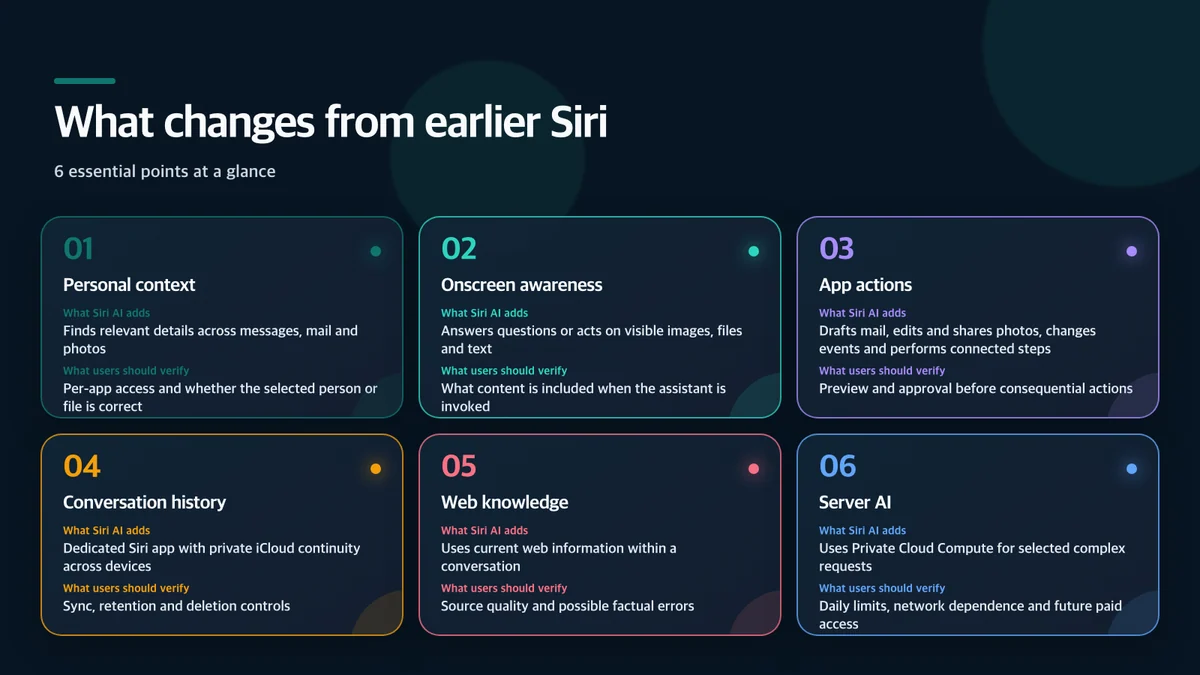
Personal context is the consequential feature
Apple’s example links several private sources: find an activity mentioned by a family member in Messages, locate a recipe from an email and add its ingredients to Reminders. The meaningful change is that retrieval and action can continue within one conversation.
Personal context does not mean unlimited access to every application. The operating system, application interfaces and user-granted permissions still define what the assistant can reach. Early users should verify:
- Whether Photos, Mail and Messages access is separated by feature or granted broadly.
- Whether external sharing presents a clear preview and confirmation.
- How easily a wrongly selected contact, event or file can be corrected.
- Where app-action history and conversation history can be reviewed or deleted.
The beta label matters here. A fluent answer can still use the wrong source or act on an ambiguous name. Users should review consequential changes rather than treating a natural conversation as proof of correct execution.
Onscreen awareness and actions
Siri AI’s visual tools appear in an iPhone camera mode, the iPad screenshot experience, a dedicated Mac shortcut and systemwide context menus. Apple demonstrates asking about an item on the screen, finding event dates and adding them to a calendar, or continuing a question about an image or file.
Writing Tools can draft text and revise tone nearly anywhere users type. Mail and Messages can use a personalized writing style. Shortcuts can build an automation from a description instead of requiring every step to be assembled manually.
Shipping support must be separated from demonstrations and announced plans. Apple says integrations such as Microsoft Outlook and Notability actions are coming. That does not mean every third-party app action is available to every U.S. beta user on day one.
Supported devices
Siri AI requires iOS 27, iPadOS 27, macOS 27, watchOS 27 or visionOS 27 and an Apple Intelligence-compatible device. Apple’s baseline includes iPhone 15 Pro and 15 Pro Max, the iPhone 16 generation and later, iPad mini with A17 Pro, iPad and Mac models with M1 or later, MacBook Neo with A18 Pro, and Apple Vision Pro.
Supported Apple Watch models rely on a nearby Apple Intelligence-enabled iPhone. Apple lists Series 9 and later, Ultra 2 and later, and Watch SE 3. Availability can still vary by language, region, account and individual feature.
Apple’s most advanced on-device model, AFM Core Advanced, has a narrower hardware set for enhanced voices and dictation. Users should not assume every Apple Intelligence-compatible device runs every model locally at the same speed or quality.
On-device processing and Private Cloud Compute

Apple Intelligence processes suitable work on the device and can send selected requests to larger models running in Private Cloud Compute. Apple says personal data handled there is not stored or made accessible to Apple or anyone else, and that outside experts can inspect the software used to support that promise.
The next generation of Apple Foundation Models was custom-built in collaboration with Google and its Gemini models. That statement does not mean Siri AI is simply the consumer Gemini application behind a new interface. Apple’s system orchestrator connects on-device capabilities such as the Spotlight index and App Toolbox with models running locally or in Private Cloud Compute.
Users should still test the boundary themselves. Compare airplane-mode behavior with a connected device, watch for notices that a request needs cloud processing, and review permissions before giving an assistant access to sensitive applications.
Daily limits and future paid access
Apple explicitly says that server-dependent features can have daily usage limits. The list includes Siri AI, intelligent photo editing, Image Playground and AFM 3 Cloud models in Shortcuts. The limit can vary by feature, request complexity, system demand and policy.
Apple has not published one fixed request or token allowance that applies to every feature. Claims that the service is unlimited—or that it always stops after a particular number of requests—would therefore go beyond the official information.
The company also says expanded access will be available for a fee in the future. The free beta experience should not be treated as a permanent promise about capacity or pricing. Heavy users should observe when the system falls back to on-device processing, delays a request or presents a limit message.
A practical beta test
- Ask Siri AI to find a non-sensitive item in Mail or Messages and inspect the source it chose.
- Use onscreen awareness with a public webpage before trying private documents.
- Create a calendar event, then verify date, time, time zone and invitees before saving.
- Test the same request online and in airplane mode to map the local/cloud boundary.
- Review Siri, iCloud and app permissions plus conversation-history controls.
- Repeat a server-heavy task over a day and record how the system explains limits.
- Keep deletion, payment, account and external-sharing actions behind manual approval.
Bottom line
The important shift is from a voice-command interface to a system-level personal assistant that can retrieve context, understand a screen and act across applications. That can remove a great deal of friction, but it also raises the cost of a wrong selection or an overly broad permission.
U.S. users should treat the English release as a real beta: test low-risk workflows, verify sources and actions, and learn which requests stay local. Device support is only the first requirement; dependable app integration, clear approvals and transparent limits determine whether Siri AI is ready for daily use.
Sources and usage notice
- Apple, Siri AI English beta and features
- Apple, original Siri AI announcement
- Apple, Apple Intelligence compatibility and privacy
- Apple Support, getting started with Siri AI on iPhone
This article independently summarizes Apple’s published features, eligibility and service conditions and adds a risk-based beta checklist. It does not reproduce Apple photography, interface screens, video, logos or product renders. Beta behavior and rollout timing can change, and Apple has not published a universal numerical daily limit.