OpenAI Dots explained A guide to its features and limits

OpenAI Dots is built around a different unit of interaction from a conventional chat: a responsibility that continues after the conversation ends. Instead of repeatedly asking for a fresh project summary, you can ask a dot to keep track of the project, prepare the next piece of work and bring back decisions that need your judgment.
Dots is the feature name; your individual agent is a dot. OpenAI ChatGPT Learn’s overview identifies GPT-6 Astra, a dedicated cloud computer, connected tools and continuing context as its foundations. None of that means unrestricted account access, unlimited execution or blanket permission to act on your behalf.
This guide explains the product’s capabilities and operating boundaries for US readers, using official documentation checked September 30, 2026. The examples and suggested rollout practices are our own proposals, not results from a hands-on performance test. Account access and individual integrations remain subject to rollout and workspace settings.
What changes when work continues between conversations
A one-off chat focuses on the question in front of you. A dot can carry forward the state of a responsibility: what has been decided, what remains open, which sources matter and what should happen next. You can add a new constraint or change priorities without presenting the whole job again.
Consider the difference between summarizing a launch plan and following the launch. The first request may end with a document. The second can involve checking updated requirements, revising a checklist and drafting material for the next decision. Actions still need to fit your instructions and the permissions of the tools involved.
Dots does not make Work or Codex obsolete. It can coordinate a continuing responsibility while delegating an individual document, analysis or coding task to those products. Separating coordination from execution also explains why the agent’s conversation, its delegated tasks and their usage limits should not be treated as one thing.
Availability in the United States
The current access section lists Pro 100, Pro 200 and Pro 500 for users over 18 outside the European Economic Area, United Kingdom and Switzerland. The United States is not in that exclusion list. Access is nevertheless gradual: an eligible subscription does not guarantee an immediate menu or every integration.
Business Premium and Enterprise are described as rolling out worldwide. Enterprise access is off by default and requires an administrator to enable it. Do not substitute the general Business label for Business Premium without checking your actual subscription and account notice.
Create a dot in the desktop app or a desktop browser. After setup, the same dot can be used in the mobile app when the supporting update is available. Mobile web is not supported. If access is missing on a phone, check the app update and account rollout as well as the plan.
The kinds of work a dot can handle
A dot can research information, analyze data, prepare documents and build software. The useful question is not simply which outputs it can produce, but which changing responsibility you want it to follow.
Possible starting points include tracking decisions in an approved project plan, keeping a customer proposal aligned with changing requirements, preparing content from interview material or investigating feedback against a connected codebase. Those are capabilities to explore with the necessary sources and permissions, not promises that every service or workflow is already supported.
A strong first assignment has an observable result. Ask for changed deadlines with source links, a draft that uses approved material or a proposed code change with test evidence. “Run everything for me” leaves too much ambiguity about completion, authority and who should receive the output.
Three connections with different purposes
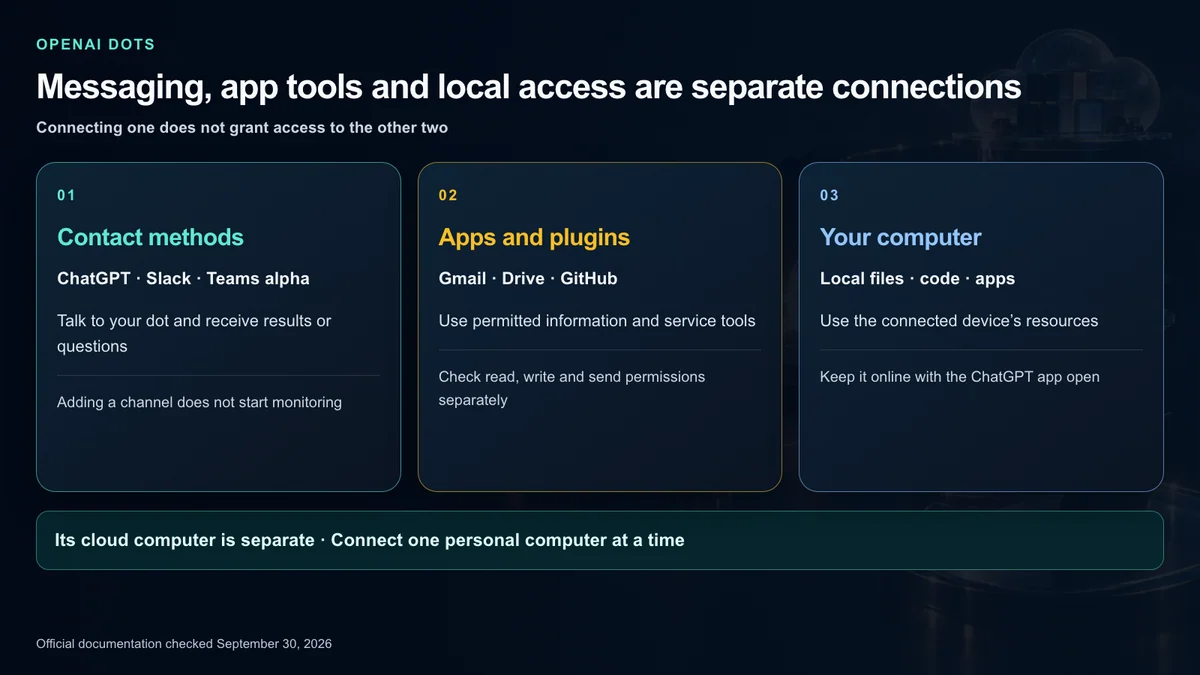
A contact method lets you talk to your dot and receive updates. An app or plugin connection makes a service’s information and tools available. Local-computer access makes that device’s files, code and supported apps usable. These are separate permissions, as the computers and apps guide explains.
Messaging a dot in Slack does not connect your Gmail inbox or your laptop. Likewise, enabling a plugin does not necessarily authorize every action it offers. A connection that permits reading email can remain different from one that permits sending it.
Supported connected tools can include Gmail for finding email, Google Drive for documents and GitHub for issue investigation or proposed changes. Check the installed plugin, connected account, permitted actions and execution environment. Local skills need a connected computer; they do not automatically become cloud tools.
What the dedicated cloud computer does
Your dot has its own cloud computer and browser for research, files and software work. Cloud work can continue while your devices are off. The environment has its own files, software and website sessions; it is not a copy of your personal browser or corporate laptop.
Open the dot’s profile and look under Computers to inspect it. Opening the computer is not the same as taking control. Use Take over to operate its mouse and keyboard, then Return control when the dot should continue.
This distinction matters for corporate access. A local VPN, device policy or existing sign-in does not automatically extend to the cloud environment. Before assuming that a job can run unattended, establish which environment has the files, tools and access that particular job requires.
When connecting your own computer helps
Local access is useful for files and development tools that live on your device. In the ChatGPT app on that computer, open your dot’s profile, find your computer under Computers and review the access confirmation.
Only one personal computer can be connected at a time. Its authorization persists between tasks, but local execution requires it to be online with ChatGPT open. A cloud agent being available does not make an offline local repository or local-only app available.
Offline means the computer cannot currently be used. It does not revoke permission. Use Revoke access to remove the grant. A Codex connection or Work Sync setting is not a substitute for the dot’s own local-access permission, and selecting a different computer does not migrate an existing task to it.
Website sign-in without putting credentials in chat
When a website needs authentication, a dot can request a private sign-in form. Enter credentials and required verification there, or take over the remote browser and sign in yourself. Do not treat an ordinary chat message as the credential-entry field.
A valid website session can remain available until you sign out or the site expires it. Optional saved credentials and an active session are different: reusing a saved login for a new sign-in requires confirmation, while an existing valid session can support later work without a new login.
Some sites block cloud browsers or demand additional checks. A connected computer may provide another execution path, but that can create a separate local task. It does not transfer the cloud session or guarantee support for your chosen browser.
Delegating work to Work and Codex
The tasks guide describes parallel background work, separate visible threads and follow-up instructions. You can continue talking to your dot while these jobs run, changing the overall direction rather than waiting for every subtask to finish.
New cloud threads appear across desktop, web and mobile. Local Codex threads remain available on the connected computer. A coding job with a specific repository and setup can use a Codex cloud environment you have already prepared; naming the project does not establish that environment by itself.
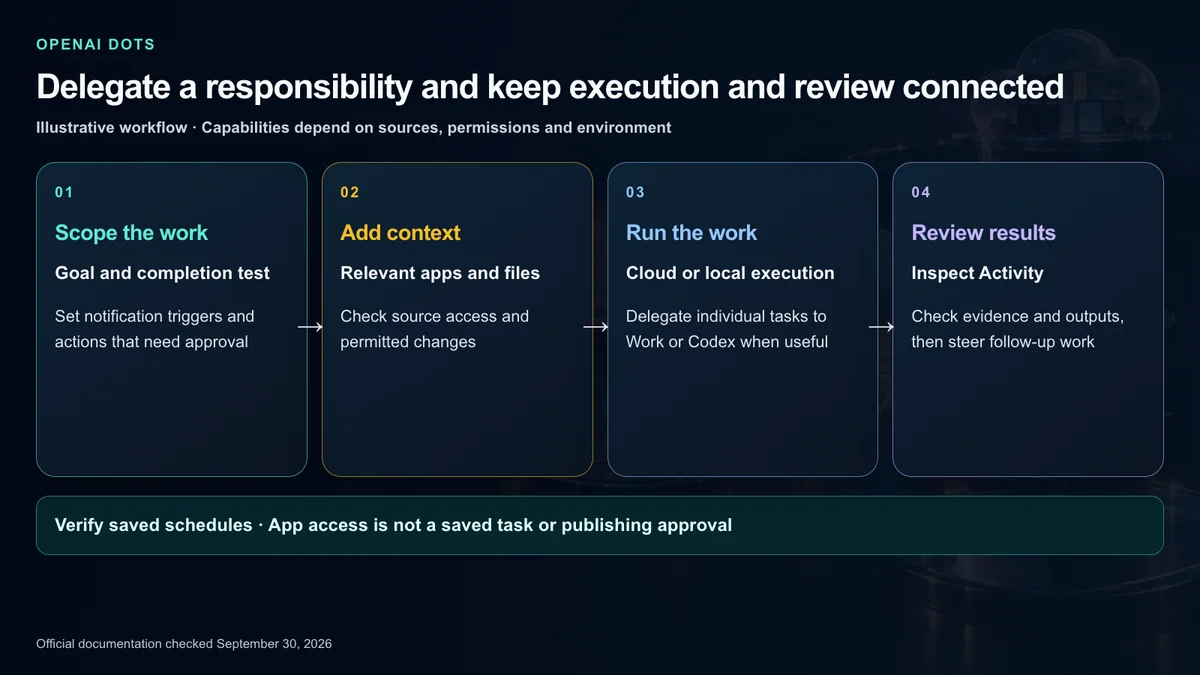
A delegated task receives instructions and context for its particular job, not an automatic transcript of every dot conversation. In the desktop app, open Activity to inspect progress, files, results and requests for input. A completed run is evidence of execution, not proof that the requested outcome was correct, delivered or approved for production.
Memory is continuity rather than a complete transcript
A dot draws on its current conversation, relevant ChatGPT memory and its own saved notes about decisions, preferences and continuing work. Those notes can change with new priorities, but they are not a complete record of everything you have said.
The same dot can use relevant context when you move between ChatGPT, Slack and Teams. The visible conversations stay separate; ChatGPT messages are not automatically mirrored into Slack. Remembering a private detail is also not permission to post it to a different audience.
Changing a ChatGPT saved-memory setting does not necessarily change notes already made by the dot. The admin guide also says disconnecting an app does not delete information already obtained. Treat app access, stored information, website sessions and deletion as different parts of an offboarding or privacy review.
Training treatment needs its own check. The data-settings section says OpenAI does not train models directly on proactive research or its private notes. If that information enters an eligible conversation or task, the applicable data settings govern it. That is not a blanket statement that every personal-account Dots conversation is excluded from training.
Schedules and supported event monitoring
A dot can decide when to follow up on ongoing work, but a job that must repeat at a fixed time needs a saved schedule. State the task, time zone, duration or end date, notification criteria and delivery location. Then verify what was saved.
Here is an original example for a distributed US product team. It assumes the account has the required features and the specified sources are connected:
For the next 4 weeks, check the approved launch plan every Monday at 9 AM America/Los_Angeles. Draft a list of changed deadlines and unresolved decisions with source links. Keep routine updates in the checklist and message me in ChatGPT only if a deadline is at risk or you need my decision. Do not send messages to customers. Confirm the saved schedule and end date.Review Scheduled and inspect the first actual run. A written request for a weekly update is not enough evidence that a schedule was registered correctly. Using a named time zone also avoids treating “9 AM” as a universal time for a distributed team.
Event monitoring is available when the connected service supports the relevant event. Define the channel, event and notification condition, and ask the dot to confirm what it can follow. Adding it to Slack does not itself create monitoring. A new-bug-report workflow still needs an explicit assignment and suitable integration support.
Proactive research is not unrestricted action
Proactive research lets a dot read permitted connected information and keep private notes about useful findings. It can relate a new decision to a draft or project discussed earlier and bring back a suggestion.
That research itself cannot send messages, change app content or control a browser or computer. Acting on a finding must follow the instructions, permissions and approval rules for that action. Conversely, an assigned recurring task can contain actions you have authorized. Do not collapse these two mechanisms into a claim that the agent autonomously changes anything it discovers.
Slack and Teams and voice
The messaging guide describes Slack direct messages and mentions in channels where you have added your dot. It responds to its owner by default. Instructions to engage with other people do not remove the safeguards governing what it shares or does.
The admin guide clarifies that only the owner can direct their dot through a Slack DM or supported mention. Other people’s messages do not start work, although a dot can use thread messages as context when its owner brings it in. That makes it a personal agent participating in a conversation, not an unrestricted shared bot anyone can command.
Teams is listed as a contact method, but the admin documentation currently limits access to an invite-only alpha. Check the contact methods actually offered in your account and the organization’s permissions rather than assuming a general Microsoft Teams rollout.
In ChatGPT, use the phone button to start a voice conversation with your dot. You can type while speaking, and assigned work may continue after the call ends. Dot-initiated calls are planned for after launch. Texting is currently described as coming soon; neither should be presented as generally available today.
Approvals and Custom rules
Before an action affects accounts or shares information, an automatic review evaluates it against instructions, permissions, custom rules and built-in safety requirements. The controls guide says the result may allow execution, request approval or hand a step to the user. Changing a password is an example of a user-only step.
This is neither “ask about every action forever” nor “one approval unlocks everything.” Asking for a reply draft does not authorize sending it. A continuing instruction can authorize future actions within its scope; work outside that scope needs another decision.
Where Custom rules is available, open Settings, Personalization and the permissions controls. The four choices have different intended behavior:
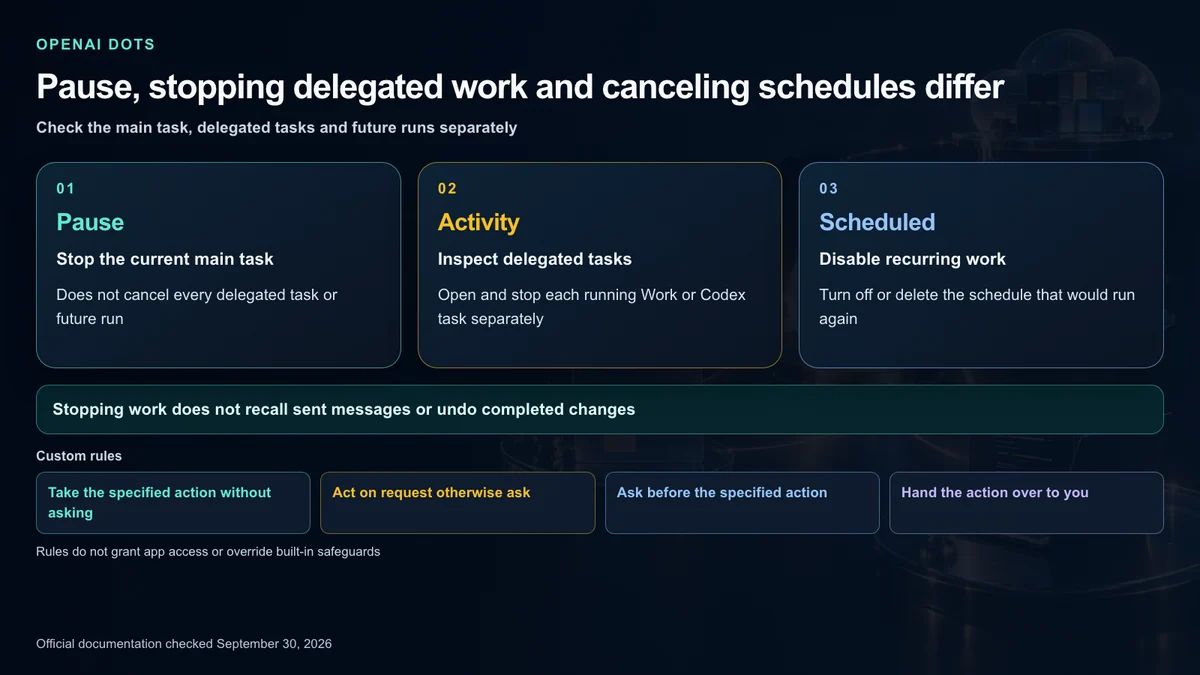
- Permit a specified action without an approval question.
- Proceed on an explicit request; otherwise ask immediately before the action.
- Require approval before the specified action.
- Have the user carry out that action instead.
For example, require approval for customer messages while reserving deletion of shared project files for a person.
Rules are not access grants or security guarantees. They do not override safeguards or the required confirmation for saved credentials, and a dot can make mistakes applying them. If a workspace disables Custom rules, saved rules do not apply. App permissions and workspace controls still need separate review.
Usage is not the same as the conversation count
The access documentation says conversations with your dot do not count toward ChatGPT usage limits. Work and Codex tasks that it starts or manages count toward those products’ limits as usual. Deeper work has a plan allowance, with extended limits for the first month after launch.
That does not make every execution free or permanently unlimited. A continuing responsibility can create meaningful task usage even when the dot conversation itself is treated differently. Check the account’s usage display instead of estimating available execution from message count alone.
We have not invented a separate flat Dots price or a fixed post-launch allowance that the cited documentation does not establish. Review your current subscription and billing terms, and do not assume access to a connected service removes that service’s own charges.
How to stop work properly
Pause stops the dot’s current main task. It does not stop every delegated task or cancel future scheduled runs. Open delegated work in Activity to stop it separately, and disable or delete a recurring task in Scheduled.
When ending a responsibility, check three things:
- Is the dot’s current main task stopped?
- Are any delegated Work, Codex or other tasks still running?
- Does a saved schedule or monitoring responsibility remain that could start work again?
Ending a call, closing an app, going offline and revoking access are different events. None automatically rolls back a message already sent or a document already changed. Before deleting a dot, read the confirmation covering conversations, memories and schedules and save results you still need. Deletion does not recall messages delivered to other people.
A practical first setup
The official getting-started guide supports a straightforward sequence: confirm access, create the dot on desktop, connect relevant apps, optionally connect your computer and assign the first responsibility.
For an initial trial, keep the assignment narrow. Specify approved sources, a result you can inspect and the actions that require your decision. Review the first output before adding repeated schedules or broader permissions. This recommendation is about making the pilot easy to evaluate, not a claim that broad tasks are technically prohibited.
A useful first instruction might ask for changes in an approved plan over the next 2 weeks, with links and unresolved questions. You do not need to connect every inbox or repository to test whether that one responsibility saves you work.
Three original workflow examples
These are proposed uses of the documented capabilities. Confirm each tool’s supported actions and your account’s permissions before implementation.
Keeping a customer proposal current
Connect the approved proposal and requirements. Ask the dot to flag changes in seat counts, technical questions and unresolved commercial terms, with drafts for internal review. Set a destination for routine updates and a different trigger for decisions requiring attention.
Check the source and arithmetic before approving external material. A change in a customer thread should not become an accepted contract term just because it appeared in an AI draft. The human review is part of the workflow, not an afterthought.
Investigating software feedback
Connect the relevant issue source and code project. Have the dot collect reproduction details and prepare a proposed change. Set up the Codex cloud environment first if the work should run there; keep the connected computer available if it depends on local tools.
Review the diagnosis, test evidence and code diff. Treat merging and production deployment as separate authorization from investigating or writing a patch. A completed coding task is not a release approval.
Preparing recurring interview content
Provide interview notes and material cleared for use. Ask for draft captions, article ideas and follow-up questions, then revise direction from your phone while the work continues. Review facts, permissions and the intended audience before publishing.
The value is continuity across source material and feedback. It is not automatic permission to distribute private interview details or publish every generated asset.
What enterprise administrators need to review
Enterprise rollout requires more than making the feature visible. Admins can separately manage Dots access, Slack participation, local-computer access, Custom rules, cloud browser and network capabilities, computer use and password-manager access.
The current admin documentation says Enterprise model controls and defaults do not apply to Dots. Review its dedicated permissions rather than assuming a model policy covers the agent. It also states that Dots local-computer access is unavailable if a cloud policy enables enforce_residency.
For offboarding, review app connections and browser sessions as well as agent access. For investigations, confirm which supported Compliance API records exist; enabling a capability does not guarantee complete audit coverage for every workflow. Personal-plan eligibility is not organizational authorization to use sensitive business data.
Where Dots fits best
Dots is most compelling when inputs keep changing, context otherwise has to be repeated and useful follow-up work accumulates between human decisions. Project tracking, proposal maintenance, feedback investigation and content preparation are reasonable trial candidates.
A one-off question may need only ordinary chat. Requirements for guaranteed unattended execution, unrestricted external actions or a perfect transcript exceed what the documentation promises. Local-only tools still need the local computer available.
The central change is the ability to delegate bounded ongoing responsibility, not just a single command. Start with clear sources and completion criteria, observe actual runs and extend access only when the workflow calls for it.
Official sources
- Dots overview and access
- Getting started with your dot
- Messaging and voice
- Tasks schedules and memory
- Computers apps and website sign-in
- Controls approvals and stopping work
- Workspace permissions and capabilities
OpenAI, ChatGPT, Dots, Codex, Slack, Microsoft Teams and related names and trademarks belong to their respective owners. Zoogom.com is an independent editorial site and is not operated, sponsored or endorsed by those companies. This article explains official facts in original wording and does not reproduce third-party photographs, product screenshots or corporate logos.