OpenAI Dots and GitHub: 6 Projects Worth Understanding
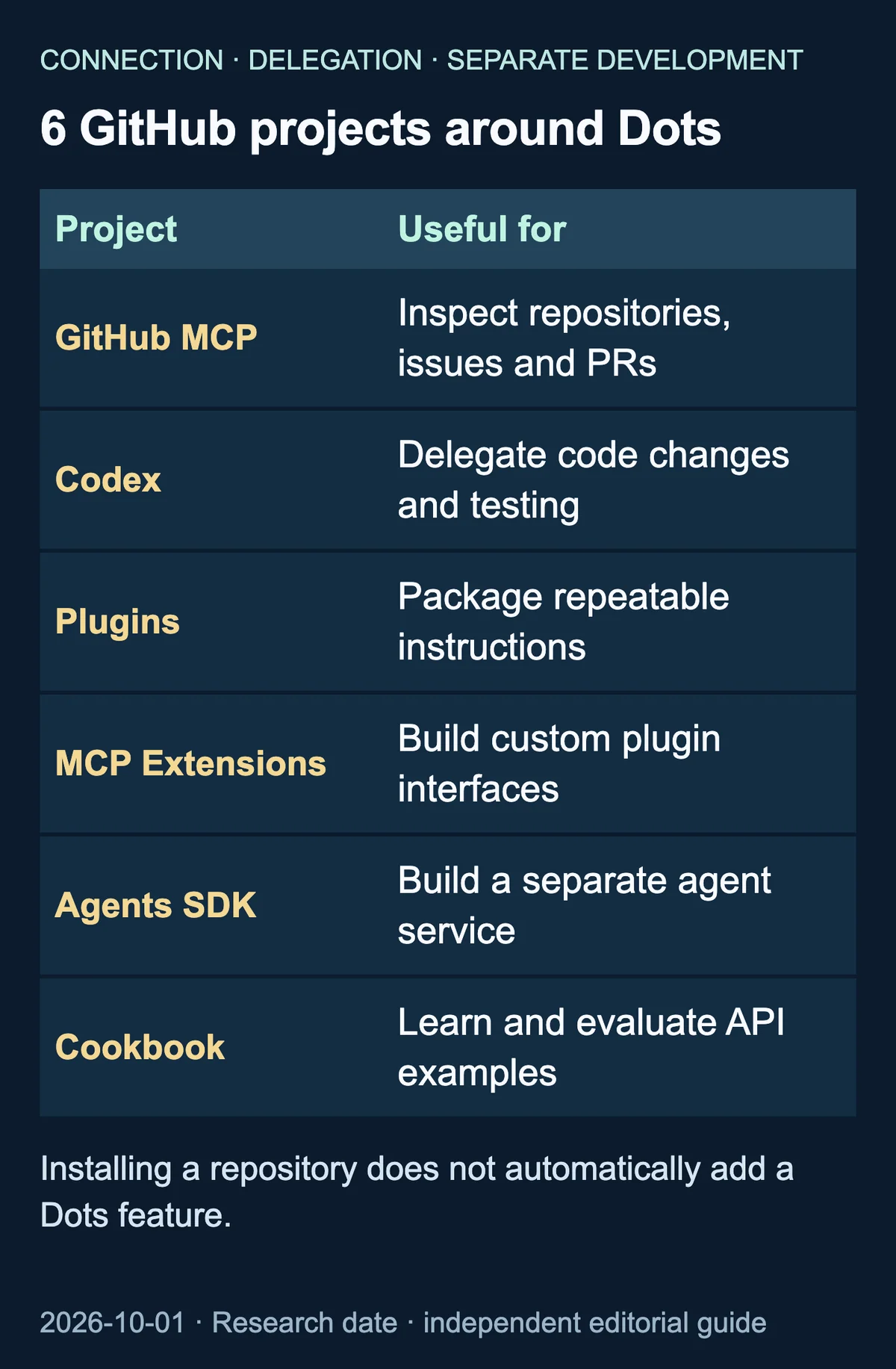
The useful starting question is not how many repositories to install. It is which GitHub job you want Dots to help with: investigating issues, preparing a code change, designing a repeatable checklist, or building your own integration.
OpenAI ChatGPT Learn’s Dots documentation establishes the product’s connected-app and task-delegation capabilities. The six projects below serve different roles around that workflow. They are not six Dots SDKs, and cloning them does not automatically enable new dot features. This is a source-based guide researched on October 1, 2026; the workflow suggestions are ours, not measured product results.
Check the connection before choosing a project
Dots needs a supported GitHub plugin that is installed, enabled and connected with appropriate account permissions. The computers and apps documentation explains those boundaries. A public repository does not grant access to your private code, and available actions depend on the tools the plugin exposes.
Local skills and local Codex work require an online connected computer with the ChatGPT app open. A prepared Codex cloud environment is a different execution location; local browser sessions and development settings are not automatically carried over.
1. GitHub MCP Server: investigate repository activity
Original project: github/github-mcp-server
GitHub’s MCP server implements tools for inspecting repositories, handling issues and pull requests, and investigating workflow runs. MCP is a connection mechanism through which an agent can use service tools.
A useful proposed starting job is a read-only report connecting unresolved issues to related PRs, or an investigation of failing CI runs. The server documents a read-only configuration that excludes write tools. However, installing this implementation does not itself establish a Dots connection. Check the supported plugin, its exposed tools and its permissions rather than assuming a direct endpoint works.
Verified root license: MIT. That label does not clear every dependency or third-party asset.
2. Codex: move from investigation to a tested change
Original project: openai/codex
This is OpenAI’s coding-agent repository. Its relationship to Dots is grounded separately in the official tasks and memory documentation, which describes delegating Codex work.
One proposed workflow is to investigate an issue, define reproduction conditions, then request a patch and test results in a prepared environment. The dot can track the broader job while Codex handles a development task. Downloading the repository is not the same as configuring that environment. PR creation, merging and deployment also need their own authorization boundaries.
Verified root license: Apache-2.0.
3. Plugins: structure a repeatable procedure
Original project: openai/plugins
This repository holds current Codex plugin examples. It is useful for studying how reusable skill instructions and service tools can be packaged. An editorial use case would be a release-review checklist that consistently separates changes, compatibility concerns and decisions requiring a person.
Examples are not proof of immediate Dots compatibility. Verify support, installation, activation and access to the relevant tools or skills in the target product. Local skills retain their connected-computer requirements.
No repository-wide root license was verified at the research date. Check the relevant package and files before copying, modifying or redistributing an example. This article uses no repository code.
4. MCP Extensions: develop a custom plugin interface
Original project: openai/mcp-extensions
This project provides ChatGPT plugin extension materials, including TypeScript and Python resources. Its interface features include sidebar access, file presentation and forms.
It is a development reference for a custom internal tool, not a Dots-specific SDK. A working interface does not establish that a dot can autonomously operate it. Required actions still need appropriate tool exposure, authentication, permissions and compatibility testing.
Verified root license: Apache-2.0.
5. Agents SDK Python: build an independent agent service
Original project: openai/openai-agents-python
This SDK is a reference for building agent applications with tool use, handoffs, tracing and human involvement. Consider it when your own system needs a custom processing workflow and execution records.
It is not Dots source code or an official SDK for extending Dots. An agent you build with it is a separate application with its own API authentication, operating environment and usage considerations. It is not a prerequisite for using Dots.
Verified root license: MIT.
6. OpenAI Cookbook: learn and evaluate API approaches
Original project: openai/openai-cookbook
The Cookbook collects OpenAI API examples and guides. It can inform the processing methods and evaluation plan for a separate integration or agent.
Running an example does not install a Dots feature. API setup, dependencies, current compatibility and reuse conditions need separate checks. No example code is reproduced here.
Verified root license: MIT.
Start with one job in 4 steps
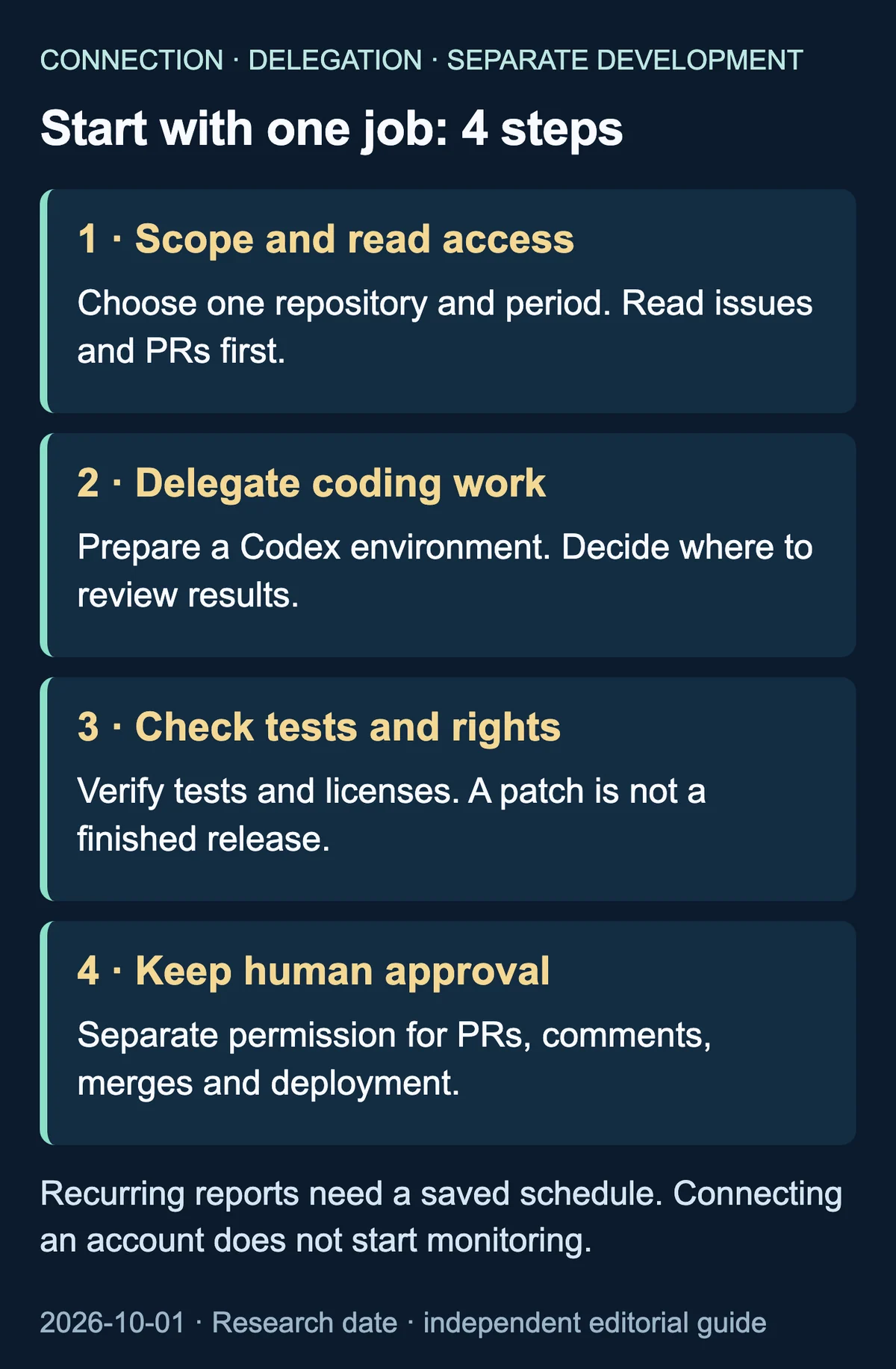
For an initial request, choose one repository and ask for a report on the past 7 days of issues and PRs, with links and unresolved decisions. Explicitly prohibit comments, PR creation, file changes, merges and deployment during that investigation.
Only after reviewing the findings should you delegate a coding task to a prepared Codex environment. Request changed files, actual test results and untested areas. Read access should not silently become write permission.
If you want a weekly report, confirm a saved schedule with a time zone and reporting time. Connecting GitHub or making a one-time request does not automatically create a monitoring job.
Current examples and reuse boundaries
The openai/skills repository is marked deprecated and directs readers to openai/plugins for current examples. Check repository status before following older setup guides.
This guide uses independent explanations and original comparison graphics, not copied code, whole README translations, screenshots or logos. Links identify sources; they do not license material copied from those sources. GitHub’s licensing guidance distinguishes public access from reuse permissions.
The MIT and Apache-2.0 notes describe reviewed root licenses only. Actual code reuse requires checking applicable terms, notices and separate third-party rights. This editorial check is not jurisdiction-specific legal advice or a guarantee of copyright compliance.